POSTED BY on 11:36 am under
Interesting article on the logistics required to roll out Australia shiny new NBN (National Broadband Network)
It's a pretty big job - no wonder it cost $43 billion!
Australia embarks on big broadband adventure | News | News.com.au

National broadband network, by the numbers

FROM snowy mountains and sun-baked deserts to the steamy tropical north, Australia has begun wiring its vast expanse with a high-tech broadband network in a giant project being closely followed abroad.

Workmen are already digging trenches in Tasmania, the first step in a $43 billion scheme which Prime Minister Kevin Rudd calls the nation's biggest ever infrastructure venture.

The ambitious plan aims to connect 90 per cent of homes, including remote outback settlements and sprawling coastal cities, with fibre-optic cable by 2017, accelerating lagging network speeds and boosting the economy.

The sheer scale of the project has drawn interest from foreign governments including the US, where President Barack Obama has outlined similar plans.

Engineers will lay cable across 7.7 million sq km of often challenging terrain which covers an area equivalent to two European Unions.

"There's no kidding about it, it's a massive job," telecommunications analyst Paul Budde said.

"You have to physically go to 10 million premises and bring a cable there, either (by) digging it or via (power) poles and then obviously it's not just having the cable, you have to have the installation in the house."

Specialised French digging machines have been shipped to Tasmania to lay the first of millions of kilometres of fibre-optic cable. By next June, three pilot towns are expected to be enjoying connection speeds of 100 megabits per second.

Just 0.1 per cent of Australians are currently linked to fibre-optic cable, with most accessing the internet over the 100-year-old copper telephone network, prompting Mr Rudd to call the country a "broadband backwater".

Mr Rudd says Australia has some of the developed world's slowest internet speeds and lowest access rates. Some outback communities rely on dial-up connections and others have no internet access at all.

"It is good for business, good for productivity, good for the delivery of e-health, good for e-education and good for Australia," Mr Rudd said this month.

Industry expert Reg Coutts, who advised the Government on the network, said the venture had attracted top-level attention in the US and elsewhere.

"There's really an absolute interest, particularly in America, but also in Europe," he said.

"People are asking, 'What the hell are you doing and how are you doing it?' People of course are sceptical," he said.

Laying the network was only the first step, he added, with the real challenge being the transition of 10 million customers from old TV, telephone and internet networks to the new system.

"That alone, we have never seen on that magnitude anywhere in the world," Mr Budde said.

Once laid, there was "really no limit" to what the fibre network could do, said Ravi Bhatia, CEO of Primus Telecom and spokesman for industry consortium Terria.

He said technological advances in areas such as satellite mapping would make the roll-out easier than it would have been even three years ago, allowing for "smart" deployment of resources and machines to dig and pull cable.

"By using the latest technology building this network we create another set of skills which we can then export to other countries and build their networks," said Mr Bhatia.

Mr Coutts said every developed country was grappling with the same question – how to replace ageing once-public infrastructure that now belonged to private companies.

Teams of lawyers and economists were racing to untangle complex commercial questions of how to use existing exchanges, underground ducts and power lines to minimise building work, said Mr Budde.

Australia moved to deal with the problem by serving telco giant Telstra, the former state-owned monopoly, with an ultimatum to split its network and retail businesses or face being barred from further wireless spectrum and slapped with tough new operating rules.

Mr Coutts said there was "a lot" of existing infrastructure that could potentially be utilised in the national broadband network but estimated it was only about 10 per cent of what was needed.

"Most of what's going to go on is purely civil works, actually pulling in and splicing optical fibre to replace the copper," he said.

POSTED BY on 2:55 pm under
Below is the text of a very interesting article at LifeHacker about the changes that have been made by the Federal Government to Telstra's monopoly control of Australian telecommunication

Credit were credit is due - I called Senator Conroy an idiot once and he probably still is but I think he got this one right

See full size image


Broken hearted about the Telstra split?

I don’t think so


Yesterday’s announcement that Telstra will be forced to split its existing infrastructure business from the rest of the companyis going to be fodder for news journalists and communications junkies for months to come. But what difference will it make to the average Internet user?

The really simple answer is: no-one knows for sure, and nothing will happen for a while, but it should ultimately result in cheaper prices and more competition for Internet services, most particularly the ADSL services used by the majority of Australians.

The reason for that is pretty straightforward. I summarised the situation back when the National Broadband Network was first announced as a government-backed project in April, and that still covers most of the key points:

Most of the problems with Australia’s current broadband infrastructure stem squarely from the decision of the Howard government to privatise Telstra without making it give up control of the existing telephone infrastructure. That effectively gave Telstra control of the ADSL market for a time, a position it repeatedly abused through such consumer-unfriendly strategies as making it difficult for rivals to add their own equipment to exchanges, or only offering ADSL2 to customers in exchanges where rivals had already set up.

According to the Australian Bureau of Statistics, 57% of Australians use some form of ADSL. The vast majority of those utilise Telstra’s network, either directly or as a service which Telstra has resold to other ISPs. Telstra controls access to exchanges, so even if ISPs want to put in their own equipment to offer advanced services, they often face a difficult time. Telstra has also been the subject of frequent criticism for the wholesale prices it charges other ISPs, which in some instances have been higher than what Telstra itself charges consumers.

Since Telstra was privatised, there have been 150 formal complaints to the ACCC regarding access to the network. As Senator Stephen Conroy pointed out in the announcement of the regulatory plans, this is far higher than the level of complaints in any other regulated industry. Forcing Telstra to structurally separate, making its copper access business entirely distinct from its retail operations, should reduce those complaints and make it easier for rivals to offer competitive services.

The biggest unknown is the impact that the National Broadband Network will have. The first backhaul projects are also designed to loosen Telstra’s control of the national network.

But predicting the future in telecommunications is notoriously difficult. Back in when Telstra was first privatised, the services which received the most attention were conventional voice telephone lines. These days, with mobile phones at more than saturation level, that seems less of an issue, while Internet access is seen as vital. At the same time, the popularity of 3G broadband suggests that ADSL Internet access may also eventually go the way of the dinosaur. For all those reasons, it’s hard to predict exactly what impact the change will have, but it’s hard to make a case for it having a negative impact in terms of consumer services.

The Telstra Split 101 | Lifehacker Australia

POSTED BY on 9:49 am under ,

http://www.abc.net.au/4corners/img/banner.jpg

About a month ago Four Corners aired an episode talking about the dangers to be found on the internet and the prevalence of cyber crime.

For those (like me) that missed it you can go to the Four Corners website and view the video, read the transcript of the show and read some other details and interviews.

The ABC do a really good job of putting their content online following in the footsteps of the British BBC who have the best media website and content I have seen.

Check out the Four Corners report Fear in the Fast Lane

Australia may be one of the most internet-connected countries on earth, with a super-fast broadband network on the way. But now the experts are warning there's danger with cyber crooks roaming the super highway.

POSTED BY on 12:45 pm under
Digital Storage vs. Physical Storage: "

I thought this was an interesting pictorial depiction of how technology has changed over time


physical storage vs. digital storage

New: Follow MakeUseOf on Twitter.

POSTED BY on 11:43 pm under
Internet Security: How Criminals Hack Other Peoples Computers: "

chained computerFor those of you that work in Information Technology and started in the last 20 years or so, chances are you were inspired by movies such as War Games, Sneakers or even Hackers. Remember that 80’s T.V. show Whiz Kids? That was cool too. I so wanted to be one of those kids.


Of course, those movies were exaggerating the power of computers or how they worked, but it was fascinating! The idea of taking control of something or figuring out how it worked by poking around and analyzing it. It was this endless world of possibilities that got us pursuing some of the most thankless jobs in the world.


So how do criminals do things like hack other people’s computers? It really doesn’t take a lot of skill at all.


Let’s assume I’m the criminal for the sake of this story. Disclaimer: I have never been charged with any crime. I do not do the things I’ll talk about here. You shouldn’t either! Do not try this at home – do it somewhere else.


The easiest way to hack someone’s computer is to get your grubby little hands on it. If I got your computer AND found that your Windows XP accounts were password protected, I would simply use a bootable password reset disk to change or remove the passwords. Then I’m in. I’m not going to tell you where to get these utilities, however, I’m sure you can use Google.


If you had Windows Vista on the disk, with it’s BitLocker technology, it would be harder to get around the protection for certain. But it can be done. I’m sure this isn’t the only method out there.


“Okay smarty-pants! You’ve gotten into my account but I have passwords on all the documents that have my important information!”


Really? First, I don’t believe you since very few people even know that they can password protect documents. Second, there’s a good chance you use the same password for all the documents. Chances are you figure that having a strong password on the Windows account is good enough, that you’ve used a pretty weak one on your documents. Any sort of password cracker using a rainbow table or dictionary attack will get through those in a matter of seconds to minutes.


What if you had set a BIOS password, so that I couldn’t even get to the operating system without knowing it? Well, that’s another step in the right direction, but, yet again, it can be done. The thing is, now I have to do a lot of work. Steal the computer, crack the BIOS password, crack your Windows protection, and crack the document protection. Since most people who steal, steal from people they know, I’ll probably know that you do these things. I’ll look for an easier target. Lazy criminal laggards!


“But Guy!” you say, “what if I do all of that but you want to get at me over the Internet?”


First off, why do you keep calling me Butt Guy? (Seriously, I NEVER get tired of that joke!) Second, um, yeah, I could do that. However, I’m less likely to try to actually hack your computer. What I’m likely to do is hack websites that you use to gather the information I need to steal your information or money. Even with some creative web searching I can get an awful lot of information on you. Seriously. Try searching on your name and aliases you use on the web. You’ll be amazed by the social profile one could build on you, to steal your identity. So, be careful about what you put out there. It’s out there, pretty much forever.


If you would like to trace someone online MakeUseOf lists a numbers of really good free tools in the post about 15 Websites to Find People On The Internet.


trojan-horseLet’s say that I’m going to hack right into your computer remotely. The easiest way to do this is to trick you into downloading software that will allow me to take control of your computer. This kind of software is known as a Trojan Horse. I may send you an attachment, or link, in an e-mail that, once you open it, installs the Trojan program without you knowing it. Or, I may set up a web page on a popular topic, that will attack your computer and drop the Trojan Horse onto it. Here’s a story on exactly that.


Once that Trojan is on there, I can use it to take information from you, or I might use it to set up a proxy for me to get to other computers. The nasty part of that is that it is possible for you to then be implicated in whatever crime I committed. Sure, a good lawyer would get you exonerated, but how many lawyers are good enough with computers to understand what just happened? By the time you pay for the lawyer, and dealt with the embarrassment of being charged, you’re already done in. Then I’m long gone.


So what do you do? Well, you keep your operating system updated, you keep your software updated, you keep your antivirus and firewall on and updated. You should also disconnect your computer from the Internet when you are not using. But really, who does all that?


Every computer is like a house – locks on the door, but a glass window right beside it. Just as my dad often said, “Locks only keep out honest people.”

Did you like the post? Please do share your thoughts in the comments section!


New on MakeUseOf ? Get cheat sheets and cool PDF guides @ www.makeuseof.com/makeuseof-downloads/


Related posts


"
POSTED BY on 10:53 pm under

Here is a round up of Windows 7 features, tricks and tips. I have been using Win7 now for about 2 months exclusively and can say it is by far the best version of Windows, whichis to say any Operating System, I have ever used. I think it sets the bar out in front of the Linux world and makes the appeal of a switch to Mac diminished again.

Windows 7 Illustrated: 10 Cool Desktop Features – PC World


Windows & Keyboard Shortcuts - PC World

Six Windows 7 Keyboard Shortcuts

Windows 7 adds some new keyboard shortcuts to the mix, all of them based on the Windows key. Here are my favorites:

Win-Home: Minimize all windows except the one that's currently active. Hit it again to restore the windows.

Win-Space: Makes all windows transparent so you can see through to the desktop.

Win-Up Arrow: Maximizes the active window.

Win-Left/Right Arrow: Docks the active window to the left or ride side of the screen.

Win-[+/-]: Enables the magnifier and zooms in/out.

Win-P: Opens Windows' presentation settings so you can quickly adjust display settings to include a second monitor or a projector.

Instantly Create Folders in Windows 7

Here's one straight from the What-Took-Them-So-Long Department: A keyboard shortcut for creating new folders: Ctrl-Shift-N.

I know, I'm excited too. You can use this on the desktop or in an Explorer window: Just give a tap and presto, you've got a new folder ready for renaming.

The Best Windows 7 Feature: The Taskbar – MakeUseOf

multiples

More Windows XP & Vista Shortcuts - PC World

Keyboard Shortcuts You Need to Know

Regular readers know of my love for keyboard shortcuts. And who can blame me? When I'm typing along in, say, Word or a blog tool, the last thing I want to do is reach for the mouse. Totally interrupts my workflow. (We writer types are all about the workflow.)

Of course, there are times when I need to select, copy, cut, and/or paste text--all functions that would seem to mandate a little mouse action. But no: You can accomplish all those tasks with a few simple keyboard shortcuts. These may seem old and obvious to some users, but trust me: Not everybody knows them.

These shortcuts work in just about every text editor known to humanity, from Word to WordPad to WordPress.

Ctrl-Shift-Right Arrow: Selects the word immediately to the right of the cursor.

Ctrl-Shift-Left Arrow: Selects the word immediately to the left of the cursor.

Ctrl-Home: Selects all text from the cursor's current position to the beginning of the line.

Ctrl-End: Selects all text from the cursor's current position to the end of the line.

Ctrl-C: Copies selected text to the clipboard.

Ctrl-X: Cuts (i.e. temporarily deletes) selected text and copies it to the clipboard.

Ctrl-V: Pastes whatever text has been copied to the keyboard.

Once you master these shortcuts, I guarantee you'll find yourself working much more quickly in Word and similar programs. So put down that mouse and keep your hands on the keys where they belong.

Launch Apps in a Flash With Windows-Key Shortcut (works in Vista too)

So help me, I'll always be a fan of Windows' Quick Launch toolbar. I showed you how to do endow it with a handy Windows Explorer icon, and I've also told you how to switch to big, Windows 7-style icons.

Today, one last Quick Launch tip--one that's sure to appeal to keyboard-shortcut nuts like me. Once you've enabled the Quick Launch toolbar, a single click of any icon is all to takes to launch that program. But did you know that each icon is automatically assigned a number and corresponding Windows-key shortcut?

For example, the first icon in the toolbar (the one closest to the Start button) is linked to "1." So by pressing Windows-1, you can launch that program right from your keyboard. Pressing Windows-2 is like clicking the second icon, and so on.

This tip works for icons 1 to 9. If you already have Quick Launch enabled, give it a try. If not, see either of the aforementioned tips to find out how to do so.

POSTED BY on 10:46 pm under ,,,

Please find some brief information on a few topics, most of which were discussed at the Mullies last week

How The Internet Works – I.P. Addresses

We discussed what an I.P or Internet Protocol address is and why some ISP (Internet Service Providers) might provide a static address for your connection.

I found the following article today which explains how the Internet works far better than I can/did.

Technology Explained: How The Internet Works – MakeUseOf.com

Map_of_the_Internet


LiberKey Portable Apps

A portable application or program is one that can run without being ‘installed’ in the traditional manner on your computer. As the program runs without prior installation it can be carried on a portable storage device like a USB stick or portable hard drive and run on any computer. This makes the program portable and useable anywhere and also easy to back up and share. There are a good number of portable applications available as well as a number of suites and packages which gather together a number of apps.

image I have been trialling the LiberKey portable apps suite and demonstrated it the other day. I quite like it as a front end to a number of small applications. The Liberkey software itself provides a sort of start menu along with an update function and the ability to switch your PC’s file associations over ( and later back) to the portable applications.

You can download any of the 3 suites but I suggest you start with the smallest ‘Basic’ suite. You can then visit their ‘All Softwares’ page to automatically add additional programs to your suite with just a click. For example portable Open Office is not included in any suite but is well worth a try and you can automatically add it to your LiberKey Suite here.

Check out the list of available programs – it is huge!

image

Of course all programs are free and many are in fact open source. Apart from a good Antivirus Program (see below) any Windows PC probably only needs this suite of applications provided with it to make a very useful and productive machine. Note to use the update functions you need to register at the website first – I did and have not received any spam or so on.

Antivirus – Eset Nod32

Since I have been using Windows 7 lately (the beta and now the release candidate) I have been trialling a few different Antivirus programs. Our old favourite at Mullies – AVG Free – does work with Win7 and is as good as usual – but how good is that. Download free antivirus

Well I also tried Avira free and really liked it too. In fact I think it was better than AVG whilst being equally as low on the resource usage. If you are looking for a free Antivirus program then I think Avira is good.

ESET NOD32 Antivirus 4


However I have since trialled a paid program in Eset NOD32 Antivirus and have found it to be the best Antivirus and Antispyware program I have used. Again it is very light on system resources and does an excellent job. If you are prepared to spend just a few dollars then please don’t buy the bloated Norton or McAfee offerings – you will be happy with NOD32

POSTED BY on 9:54 pm under
Search For The Manual You Need With Manuals Online: "

ManualHead I used to keep all my owner manuals for everything. Starting with my original Nintendo Entertainment System way back when. Now I just mail in my warranty card and chuck the manual.


No I am not a mad man or a lunatic – it is simply a different time we live in than back then. Now almost anything can be found on the internet – and Manuals Online has you covered when it comes to owner manuals and user guides.


When you arrive at the site you will see something that looks like this:


manuals1


To search for a product enter its name or model number into the search field. A generic search will give you LOTS of results and a model number will usually result in one or two items. I decided to search for a DustBuster. I typed in Dustbuster and hit Search.


manuals2


I got back 4 items for four different models. You can download the manual as a PDF, save it to your folder on their website (requires registration), you can also view forum discussions about your item as well.


manuals3


I got a little more specific and typed in Sony Play Station 2. I got a few results and chose the model I was looking for. I was then able to preview the owner manual and eventually downloaded it. I could also ask members for help or share information about the product.


You can see below the item’s additional product literature. In this case it looks like the quick start guide but it can vary from product to product.


manuals4


Upon opening the document it will display the PDF in your browser. You can also save the file by right clicking on the link and choosing “save target as”.


manuals5


Alright so who’s ready to go clean out their attic/filing cabinet? Do you have another slick trick when it comes to dealing with owners manuals? If so we would love to hear about it in the comments! Now I have to get back to some old school gaming :)

Did you like the post? Please do share your thoughts in the comments section!


New on MakeUseOf ? Get cheat sheets and cool PDF guides @ www.makeuseof.com/makeuseof-downloads/


Related posts


"
POSTED BY on 10:52 am under ,

You may recall I have touched on Twitter here on Mullies once already – see:
So what is this Twitter thing? YouTube knows.

Twitter.com
As I described Twitter then:

It is a quick message writing service where you can publish notes that anyone can view. Kind of like a blog page but more like a 'status update'. Those who have used Facebook status updates will know what I mean.

Since that entry I have shown some of you Twitter and we discussed how many prominent people such as celebrities and sports stars are revealing information via Twitter – sometimes when they shouldn’t. As Stan said – it can be a bit like a celebrity gossip channel at times too! After all Oprah did a show about Twitter as well

Since the last post I have found an excellent source of information on Twitter for beginners. It is called the 12 days of Twitter and was write by a well respected online journo called Cali Lewis. Click on the link below to learn more about Twitter and how to use it:

12 Days of Twitter 12 days of twitter

GeekBrief.TV | Video PodcastOh and here is a link to Cali’s other work  - a video podcast reviewing gadgets and technology called GeekBrief.tv

You can use Twitter straight from the web at www.Twitter.com but there are lots of free programs you can use on your desktop instead.

My personal recommendation for the best way to use Twitter is Tweetdeck.
Tweetdeck can include Facebook status updates too so you can get more information in one place if you use both Twitter and Facebook like I do.TweetDeckOf course part of the popularity of Twitter stems from the fact you can ‘Tweet” (which means write an update to your Twitter page) from your internet enabled mobile phone. That is what makes it popular with the celebrities and the ‘cool kids’. So one of the reasons I like Tweetdeck is that they have an application I can load on my iPhone as well. If you have a capable phone there will be a program for you too – or you can just pull up the Twitter page on your internet browser.

If you do sign up to Twitter make sure to follow me  - which is like ‘add me as a friend’. My user name is Noblejoker – find me here www.Twitter.com/Noblejoker And send me a message so I can follow you in return

POSTED BY on 2:12 pm under ,

I stumbled across the following website which is offering 1,000 songs free to download and play on your computer, MP3 player (iPod), or even burn to a cd.

http://www.reverbnation.com/windows

The free downloads are supported by Microsoft Windows of all people. I guess the way to beat piracy is to give things away. I doubt they will adopt this attitude with their Operating System or Office software anytime soon.

The songs are in genres including Alternative, Electronica/Dance, Hip Hop, Jazz, Latin, Pop and Rock. Strangely there is no Classical category but there are a number of instrumentals among the Jazz and Latin categories.

Most of the artists you will have never heard of but there are a couple of Australian bands in there like The Church and a cool Jazz/Fusion band from Sydney call Urban Gypsies. You can play the songs on the website by just clicking the Play button next to the song. If you hear something you like you can download in either M4A or MP3 format. If you don’t know which format to choose go with MP3.

So have an explore and listen to something new today

Free music

POSTED BY on 10:43 am under ,,

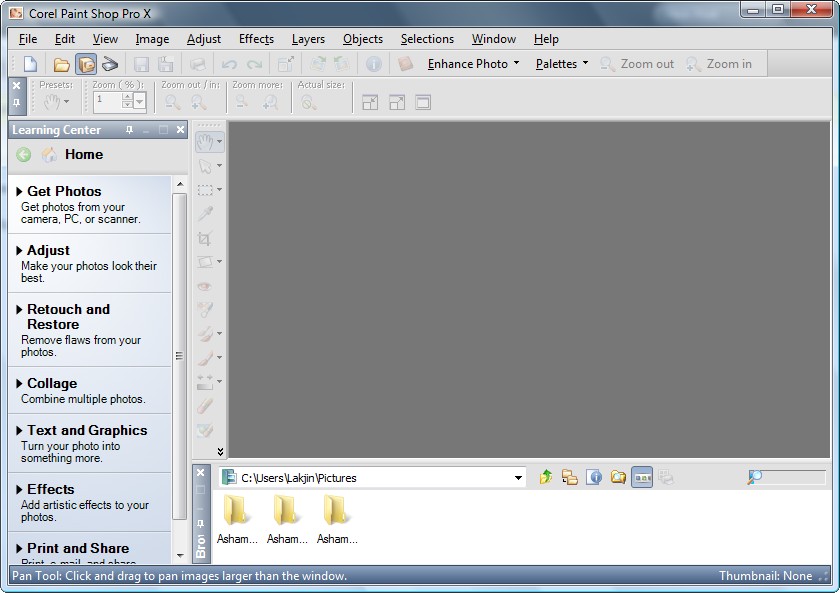
Today I have got a link to download Corel Paint Shop Pro version X (10) for free. This is commercial photo editing software that rivals Adobe Photoshop for functions and usefulness. Recent changes have made it easier to use for beginners whilst retaining the full power of the software if you want to get down to very fine details and editing. If all you want is to remove red-eye, crop and touch up photos then this is too much for you – try Google’s Picasa which is free. But if you want a really powerful program then this is a good one. And hey – this version is totally free so give it a go. It is a large download though (about 100mb) so dial-up users beware.

Some more details on Paint Shop Pro from this sites:

2009-07-15_210901

So before I spill the beans on from where to get this software, let me highlight a few features of Corel Paint Shop Pro X:

  • One-Step Photo Fix. With just one click, the One-Step Photo Fix command automatically adjusts the color balance, contrast, clarity, and saturation of an image. It also sharpens the image.
  • Background Eraser. The Background Eraser tool lets you easily erase unwanted backgrounds while retaining the fine detail in your photos. It's a perfect first step before copying and pasting elements from one photo into another.
  • Raw file format support. Paint Shop Pro X continues to support the Camera Raw file format. You can open, enhance, process, and convert images that were saved on your digital camera in the Raw file format.
  • Picture Tubes™. A longtime favorite, the Picture Tube tool lets you paint on your photo with a collection of professionally-designed artistic elements. For example, you can add butterflies and beetles to a picnic setting, fill an aquarium with fish, or frame a picture with holly. Picture Tubes are available in a variety of themes, including Animals, Artistic, Embellishments, Nature, Photo Objects, and Plants and Leaves. You can also create your own picture tubes.
  • Scripting. A Paint Shop Pro powerhouse, scripting can save you tremendous amounts of time, especially when you are working with batches of images. You simply record a series of commands and then play them back to process an image or batch of images.
  • Batch Processing. You can easily process batches of images with Paint Shop Pro. The Batch Process command lets you use scripts to apply fixes to batches of images, and you can also convert batches of images to a different file format.
  • Lens Correction filters. Paint Shop Pro continues to provide excellent Lens Correction filters that help you correct common photo distortions, such as fish-eye, barrel, and pincushion.
  • Perspective Correction tool. With this tool, you can easily fix buildings, landmarks, or other objects that appear to be leaning away from you in photos taken at an upward angle.
  • Straighten tool. This tool lets you quickly align crooked photos by just pointing out a line that should be horizontal or vertical but isn't.
  • Scratch Remover. The Scratch Remover tool instantly removes scratches, wires, and other linear flaws from photos. This tool is particularly useful for removing scratches or cracks when restoring old photos, and is also an incredible tool for reducing face wrinkles in photos.
  • Clone tool. The Clone tool lets you cover flaws in your photos by copying detail from a neighbouring area. You simply choose a source location and then draw over the flawed area of the image. This replaces the flaw with detail from the source location.
  • Motion Blur. You can add Motion Blur to a photo to create the illusion that the photo was taken while the subject was in motion.
  • Distort photos. The Warp Brush lets you create caricatures of your subjects by distorting pixels in a particular area of the photo.

As I said, that is just a few features of Corel Paint Shop Pro X - it really doesn't do justice to the program. If you would like to learn more, you are welcome to read the excellent review on it written by Photo-i.

Now this definitely isn't the latest Corel Paint Shop Pro X2 Ultimate edition (that one will cost you around AU$100 - click here to read about the differences in features between all the editions) - but this is still an excellent program worth having if you need this sort of thing.


***Corel Paint Shop Pro X System Requirements:

  • 500-MHz processor
  • Windows® 2000 (SP4) or Windows XP (it works fine on Windows Vista)
  • 256 MB of RAM
  • 500 MB of free hard-drive space
  • 1024 x 768 resolution display, 16-bit color
  • Macromedia Flash™ Player 7 (included)

Here are a couple of links to download from (just in case 1 stops working)

Download Link 1

Download Link 2

POSTED BY on 11:35 pm under ,,

So what is this new social media thing Twitter all about I hear you ask?

Well I have been on Twitter for about a year or so. It is a quick message writing service where you can publish notes that anyone can view. Kind of like a blog page but more like a 'status update'. Those who have used Facebook will know what I mean.

There has been a huge surge in popularity as more celebrity users come on board. Oprah did a special on it one day and the users doubled overnight or something.

Anyway - if you want a more comprehensive description of Twitter and how it works then it is off to YouTube which has loads of 'How-To' type videos about Twitter. The MakeUseOf blog has compiled a list of 7 good choices to start.

Check them out: Top 7 Twitter Tutorials on YouTube

If you do succumb to the Twitter phase then I have 2 suggestions.

  1. Follow me @Noblejoker, and
  2. Give Tweetdeck a try - it is the best desktop Twitter software I have used

POSTED BY on 5:42 pm under ,

Some of us may have been following the whole ‘OzCar’ affair amongst our Federal politicians. (see Turnbull denies passing on fake email) . Me – I couldn't care less but I did find it interesting how technology particularly emails and their authenticity entered into the accusations.

At our recent meeting Ross mentioned it made him curious about how the email header worked in his email program and whether he could change it – and he could.

Most desktop email programs – such as Thunderbird, Outlook, Outlook Express or the updated version called Windows Mail or Windows Live mail - will allow you to specify to specify a ‘From’ address with some even doing so on a per email basis. The details you write in the From address don’t have to be the actual address you are using, that is they don’t have to correspond with the address that your Internet Provider or email provider (if you use a Yahoo, Gmail or other address) has given you. This sort of spoofing of addresses is an old way of sending spam which of course looks to come from someone other than the real spammer

The secret is not in the sender but in the receiver because all of the details of the email are contained within the ‘Header’ of most any email message and it isn’t hard to see them if they aren’t shown by default.

image

Below is an excerpt from an article at MakeUseOf.com that discusses the information contained in every email and the ways in which you can find it for yourself.

How To Trace Your Emails Back To The Source

Most people won’t notice this, but emails actually arrive in your inbox with a ‘receipt’, which contains a lot of information about the sender. In order to find the sender’s identity, we only need to retrieve an IP address, but inside the email header we can also find the originating domain, reply-to address and sometimes even the email client, for example Thunderbird.

Why would you want to find out the identity of the sender? Well, you may have heard of shady email scams or emails supposedly from Paypal inviting you to re-enter your personal information. Now, you can determine if an email is truly from the authentic source.

Accessing the email header is different for every email provider or email application, and sometimes, it is even hidden. In most of the cases however, the option to reveal the full header will be somewhere in the area where the subject and sender name are provided.

So read the article and next time you get a suspicious looking email you can check it out. You never know – it might be from Ross! :)

POSTED BY on 3:18 pm under

I read an interesting article at Windows Secrets today about Internet Service Providers doing more and more to inspect and filter the web traffic of their users. The idea is that the ISP is helping to protect copyright by not allowing users to access copyright material to download. So that song or movie you want to get on Bit Torrent or Limewire will be blocked and or your internet access will be banned.

OK – so breach of copyright is illegal. Fair enough.

The problem is that in some cases for the ISP to know what you are doing they need to look at all your data. We may all be doing perfectly legal and acceptable things on the internet that we don’t want people looking at. No I don’t mean porn! What about confidential business emails or personal voice chats? You wouldn’t want someone to tap your phone and listen to every call you make and this is the same sort of invasion of privacy.

And I don’t blame the ISP’s really. They are smaller businesses who are being confronted by the Big Brothers in the Movie & Music industries.

As per usual though these sort of rules only catch the innocent or naive. There are ways around it and we will discuss some this week at the Mullies meeting this week.

ISPs assist in cutting off file-sharing users – Windows Secrets

image